
Darts Club: PvP Multiplayer
BoomBit GamesSports
4.520.75K Reviews
- Version
- 7.6.6
- Installs
- 10.00M
- Age Rating
- Everyone
Screenshots



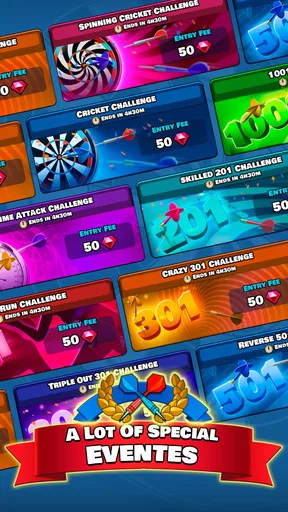

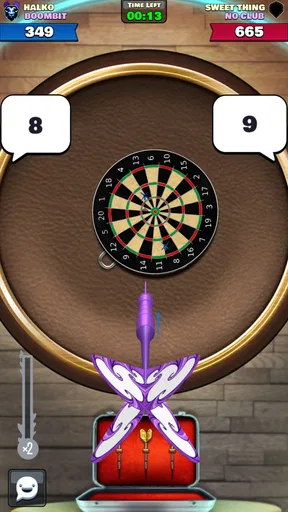
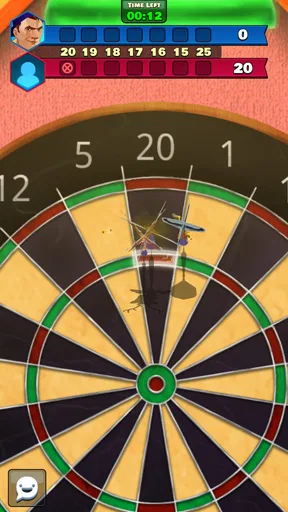

Our Review of Darts Club: PvP Multiplayer
 Analysis by Appyee
I can see why Darts Club: PvP Multiplayer is tempting for a shared living room: it turns a familiar pub game into a quick phone match, so someone can play while others watch or take turns. I’d treat it as a casual competitive game rather than a full replacement for a real dartboard. The screen makes it easy to start, but aiming by swipe still rewards practice, and the online focus means it suits people who enjoy a little rivalry more than those looking for a quiet, offline pastime.
How it fits into a shared routine
For a household, the simplest way to enjoy it is to make each match a small event: one person plays, everyone else calls a target or reacts to the throw, then you pass the phone along. That works especially well during a short wait, such as while dinner is being prepared or before a show begins. It gives the game a social role without requiring a console, a table, or a physical dart set.
There is a practical distinction between taking turns on one device and each person playing separately. A shared screen is convenient for casual reactions, but the competitive PvP experience is centered on matches against other players. If you want a household tournament, agree on who is using the device and how you will keep track of your own results; don’t assume the game provides a family scoreboard or separate household profiles.
Set expectations before handing over the phone
The game is free to download, and its in-app purchases range from $0.99 to $99.99 per item. That makes a quick setup conversation worthwhile if a child or another family member can use the device’s purchase options. I’d check the device’s own purchase safeguards and make clear whether spending is allowed before leaving the game open. That is a sensible boundary for any free-to-play title, not a reason to avoid this one.
It is also worth deciding whether a shared device is meant for occasional turns or one person’s ongoing play. The game includes customization and progression, so different people may care about the same collection or advancement in different ways. I would avoid treating a single shared game state as though it were automatically a set of private profiles. If each player wants an independent experience, individual devices and accounts are a cleaner arrangement, provided the players are comfortable setting those up.
Good for quick coordination, less suited to long sessions
A useful tip is to separate practice from the urge to win every online match. Swiping can feel straightforward at first, but small differences in how you aim and release affect consistency. A few deliberate throws help you learn your own rhythm; jumping straight from one competitive match to another can make a missed shot feel like bad luck when it may simply be an unsteady gesture. On a phone, grip and screen position matter, so settling into a comfortable hold before a match is a modest but practical advantage.
For a shared household session, decide in advance whether spectators are coaching or just watching. Advice from the side can be fun, but several people giving conflicting instructions can make a precision game frustrating. I’d let the current player choose their own aim, then hand over the device after the match rather than mid-turn. That keeps the competition friendly and avoids disputes over who made a particular throw.
Age, trust, and online play
The content rating is Everyone, which makes the theme broadly approachable for different ages. Still, an all-ages rating does not mean every child will enjoy competing with strangers or understand purchase prompts the same way an adult does. I’d introduce the game with a quick explanation: it is a sports-style dart game, other players may be part of the competition, and any spending should be discussed with the device owner.
The online element is part of what gives matches their competitive energy, but it also means this is not the same as a private family board game. If you want a fully controlled activity with only familiar opponents, a physical dartboard or a game explicitly designed around local turns may be a better fit. If you are comfortable with online competition and simply want a short skill-based diversion, the multiplayer angle is a strong reason to try it.
Where it stands beside other dart games
Compared with a traditional dart app that mainly offers solo scoring or practice, this one puts more emphasis on head-to-head play, progression, and customizing equipment. That gives each session a clearer goal than simply recording a score, though it also ties more of the appeal to online competition and continued play. Compared with real darts, it is much easier to start and needs no room or equipment, but a swipe cannot reproduce the feel of holding and releasing a physical dart.
That trade-off points to its best audience: someone who likes darts, quick mobile matches, and gradual personalization, but does not need a serious training tool. A committed player who wants to practice real throwing technique should use a real board when possible. A person who dislikes competitive matchmaking or prefers a game with no progression loop may be happier with a straightforward offline scoring app.
Who should skip it, and what to check first
I would skip it if your main priority is a completely offline experience, if you do not want to engage with opponents online, or if you expect physical-dart accuracy to transfer directly from touch controls. It is also not ideal for someone who wants a calm game with no pressure to improve. Its approachable controls make the first match easy to understand, but getting reliably precise takes patience rather than a one-time tutorial.
Before installing, check that your device runs Android 7.0 or later if you are on Android. The game is free, with optional purchases, and is developed by BoomBit Games. It has a 4.5 average from around 321,000 ratings, with more than 10 million installs. Those figures suggest broad interest, but they do not tell you whether its swipe-based style will suit your hands or whether you will enjoy playing against other people. I’d use the first few sessions to judge those things for yourself instead of treating popularity as a guarantee.
The current version is 6.3.0, and the game has been available since September 26, 2018. That history makes it a familiar, established option in mobile sports gaming rather than a new experiment. For a household, though, the important question is still simple: will people enjoy taking turns and cheering on a close match, or would they rather play something cooperatively without an online opponent? Answering that honestly helps avoid downloading it just because darts sounds like an easy group activity.
Getting Started
When you first launch Darts Club: PvP Multiplayer, you'll be greeted with a sleek and colorful interface that draws you right in. The app is available for both Android and iOS, so whether you're team Apple or Android, you can join in on the fun. Signing up is a breeze, and before you know it, you’ll be thrown into your first match.
Gameplay and Mechanics
The gameplay is where this app truly shines. The mechanics are intuitive, and the controls are as smooth as butter. You simply swipe to aim and release to throw your dart. It might sound simple, but trust me, it takes a bit of practice to master. The physics engine is surprisingly realistic, so every throw feels satisfying, especially when you hit that sweet bullseye!
The game offers various modes, but the real thrill comes from the PvP multiplayer experience. Competing against players from around the globe keeps things fresh and exciting. You can even challenge your friends and show off your skills. Just a heads-up, it might get a bit competitive!
Customization and Progression
One of the coolest features is the ability to customize your darts. There’s a wide range of options to personalize your set, from the flights to the barrels. As you play and win matches, you’ll earn coins and unlock new parts. This progression system keeps you motivated to keep playing and improving.
And let’s not forget about the various locations you get to play in. Each venue has its own vibe, adding a nice touch of variety to the game. From bustling pubs to exotic locations, it feels like a mini world tour of dart competitions.
Graphics and Sound
The visuals are vibrant and polished, capturing the essence of a true dart match. The sound design complements the graphics perfectly, with satisfying sound effects every time you hit the board. It really adds to the immersion and makes you feel like you're right there in the action.
Final Thoughts
In a nutshell, Darts Club: PvP Multiplayer is a fantastic app for anyone looking to dive into the world of darts. Whether you're a seasoned player or a newcomer, there’s something here for everyone. The combination of intuitive gameplay, customizable options, and competitive multiplayer makes it a must-try.
So, if you're ready to sharpen your aim and challenge players worldwide, download the app and start throwing those darts. Just remember, practice makes perfect, and you might just find yourself hooked!
Privacy and Permissions
See what permissions an app requests and how it handles your data.
- Wi-Fi connection information
- view Wi-Fi connections
- Other
- view network connections, full network access, control vibration, prevent device from sleeping, Google Play license check
Verdict
Strengths of Darts Club: PvP Multiplayer
- Engaging multiplayer matches.
- Customizable darts for strategy.
- Smooth and intuitive controls.
- Vibrant graphics enhance play.
- Regular updates with new features.
Limitations of Darts Club: PvP Multiplayer
- In-app purchases can be pricey.
- Ads can interrupt gameplay flow.
- Requires stable internet connection.
- Limited offline play options.
- Progression can feel slow.
Other Releases by BoomBit Games
View All
Boss Fight
Sports4.2

Hunt Royale: Action RPG Battle
Action4.3

Boxing Ring
Sports4.6

Bowling Club: Realistic 3D PvP
Sports4.5
Similar Picks in This Category
View All
8 Ball Pool
Miniclip.com4.8

Pooking - Billiards City
AIM TOP GAME TECHNOLOGY LIMITED - pool4.6

Carrom Pool: Disc Game
Miniclip.com4.4

EA SPORTS FC Soccer Mobile 26
ELECTRONIC ARTS4.6

World Soccer League
mobirix4.3

Soccer Cup 2026: Football Game
INLOGIC SPORTS - football tennis golf soccer4.3
Frequently Asked Questions
What is the main objective of Darts Club: PvP Multiplayer?
Darts Club: PvP Multiplayer is a competitive dart-throwing game where players aim to score points by hitting specific areas on a dartboard. The main objective is to outscore your opponent in one-on-one matches by hitting the target with precision and strategy. As you progress, you can upgrade your darts and unlock new parts for enhanced gameplay.
How do I upgrade my darts in the game?
In Darts Club, upgrading your darts is crucial for improving accuracy and performance. You can collect dart parts and upgrade them through the in-game shop. As you win matches and complete challenges, you'll earn coins and rewards that can be used to purchase and enhance dart components, giving you a competitive edge.
Are there any social features in Darts Club: PvP Multiplayer?
Yes, Darts Club includes several social features to enhance the multiplayer experience. You can challenge friends to matches, join clubs, and participate in global tournaments. The game offers chat functionalities, allowing players to communicate with opponents and club members, fostering a vibrant and interactive community.
Is Darts Club free to play, and are there in-app purchases?
Darts Club is free to download and play, providing access to various features and gameplay modes without initial cost. However, it includes in-app purchases as well, allowing players to buy coins, dart parts, and other items to enhance gameplay. These purchases are optional and not necessary to enjoy the game fully.
What devices are compatible with Darts Club: PvP Multiplayer?
Darts Club: PvP Multiplayer is available for both Android and iOS devices. It's designed to run smoothly on most smartphones and tablets. However, for optimal performance, it is recommended to have a device with updated operating systems and adequate processing power to handle the game's graphics and online features efficiently.
Play our best games!


